AI Model Names Explained
AI Model Names Explained: Decoding Claude, GPT-4, Gemini & Llama
Reading time: 8 minutes
Have you ever looked at a name like "claude-3-5-sonnet-20241022" and felt completely lost?
You're not alone.
LLM names look like someone smashed their keyboard and called it a day. But here's the thing: there's actually a logical pattern behind every single one of them.
Once you understand this pattern, you can decode any name in seconds. More importantly, you'll make better decisions about which tools to use for different use cases—whether that's coding, writing, or analysis.
In this guide, I'll break down exactly what each part means, why the seemingly random numbers matter, and what those confusing suffixes like "turbo" and "instruct" are telling you.
Let's decode the mystery.
The Anatomy of an LLM Name: How Generative AI Naming Works
Every large language model name follows a similar structure. Think of it like a formula:
[Family] - [Version] - [Variant/Tier] - [Date or Build Number]
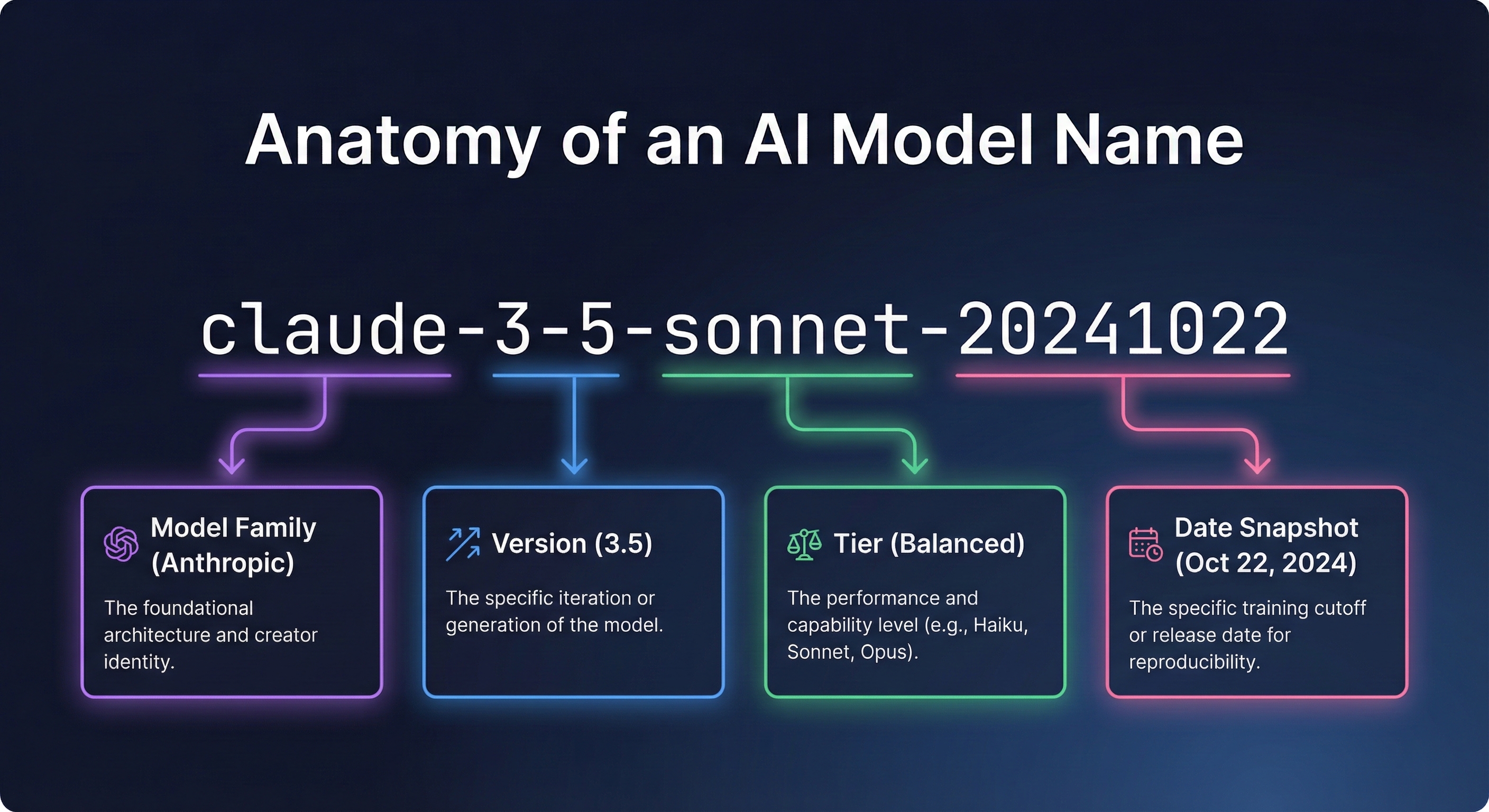
Let's break down a real example:
claude-3-5-sonnet-20241022
Part Value What It Means Family claude The product family Version 3-5 Version 3.5 Variant sonnet Balanced tier (mid-range) Date 20241022 October 22, 2024 snapshot
Now let's look at each component in detail.
Understanding the Major Families: Claude, GPT-4, Gemini & Llama
The first part of any name tells you who made it and which "family" it belongs to.
Here are the major families you'll encounter:
Claude
Created by Anthropic. Known for emphasizing safety and helpfulness. Popular for coding tasks, analysis, and writing. The naming convention uses poetic terms (Opus, Sonnet, Haiku) for different tiers.
GPT (Generative Pre-trained Transformer)
Created by the company behind ChatGPT. This pioneered the modern chatbot era. GPT-3.5 and GPT-4 are the most commonly referenced versions. The "o" in gpt-4o stands for "omni," indicating multimodal capabilities.
Gemini
Google's latest family, replacing the earlier "Bard" and "PaLM" names. Known for strong benchmark performance and integration with Google's ecosystem. Comes in Pro and Flash variants.
Llama (Large Language Model Meta AI)
An open-source family that you can download and run locally. Popular for self-hosting, fine-tuning, and use cases requiring data privacy. Available in various sizes from 8B to 405B parameters.
Other Notable Families
Mistral - A French company known for efficient open-source releases.
Qwen - Alibaba's family, strong in multilingual capabilities.
Grok - xAI's offering, integrated with the X platform (formerly Twitter). Known for real-time information access and a more informal personality.
Why does the family matter?
Different creators have different strengths. Knowing the family helps you understand:
Where your data goes when you use the API
The general capabilities and personality
Pricing structures and availability
Whether it's open-source or closed
Version Numbers Explained
The version number tells you which generation you're looking at.
Understanding version formats:
Sometimes you'll see a single number:
gpt-4 (version 4)
gemini-1.5 (version 1.5)
Sometimes you'll see hyphenated numbers:
claude-3-5 (version 3.5)
What the numbers mean:
The first number is the major generation. This represents a significant leap in capabilities. Going from version 3 to version 4, for example, typically means major improvements in reasoning and accuracy.
The second number (when present) is the minor iteration. Version 3.5 improves on version 3, but it's not a completely new architecture.
Common misconception:
Higher numbers don't always mean "better for every task." A newer balanced-tier release might outperform an older flagship on certain benchmark tests while being faster and cheaper. Version numbers indicate generation, not absolute quality rankings.
Tiers: Claude Opus vs Sonnet vs Haiku Comparison
This is where things get interesting. Most providers offer multiple "tiers" of each version.
The Claude tier system:
Opus = The most capable and smartest option. Best for complex reasoning, research, coding challenges, and nuanced tasks. Also the slowest and most expensive.
Sonnet = The balanced middle tier. Good performance at reasonable speed and cost. Best for most everyday use cases.
Haiku = The fastest and cheapest tier. Best for high-volume, simpler tasks where speed matters more than maximum intelligence.
Other tier approaches:
gpt-4o vs gpt-4o-mini = Full capability vs. smaller/faster/cheaper
Gemini Pro vs Flash = Maximum capability vs. speed-optimized
Llama 405B vs 70B vs 8B = Different parameter sizes for different hardware and use cases
Why tiers exist:
There's always a tradeoff between three things:
Intelligence (how capable it is)
Speed (how fast it responds)
Cost (API pricing per token)
You can optimize for two of these, but not all three simultaneously. That's why providers offer multiple tiers—so you can choose the right tradeoff for your specific needs.
Using the flagship tier to answer "What's 2+2?" is like hiring a brain surgeon to put on a bandaid. Match the tier to the task.
Why Date Stamps Matter
This might be the most important part of an LLM name—and it's the one most people ignore.
What the date means:
The date suffix (like 20241022 or 0125) represents a specific "snapshot" or "freeze" of that release.
Why dates matter enormously:
LLMs are constantly being updated. Providers regularly improve their offerings—fixing bugs, improving capabilities, adjusting behaviors, and updating safety features.
This sounds great until you've built an application that depends on consistent behavior.
Imagine you build an app using an API. It works perfectly. Users love it. Then one morning, everything breaks. Responses are longer, certain prompt patterns are refused, or outputs are formatted differently.
What happened? The underlying system was updated.
Date stamps solve this problem:
When you specify a dated version, you're "pinning" to that exact snapshot. The behavior won't change until you explicitly decide to upgrade.
Here's what different approaches mean:
✅ gpt-4-turbo-2024-04-09 This will always behave exactly the same. Safe for production applications where consistency matters.
⚠️ gpt-4-turbo This points to whatever the provider considers the current "default" version. It could change at any time without notice.
🚨 gpt-4-turbo-latest This explicitly points to the newest version. It WILL change. Useful for testing, risky for production.
My recommendation:
If you're building anything that depends on consistent behavior through an API, always pin to a dated version. You can always test newer versions and upgrade intentionally—but you don't want surprises breaking your application at 2 AM.
For casual use (chatting through a web interface), the date doesn't matter as much. Those interfaces handle version management for you.
Common Suffixes Decoded: Turbo, Instruct & More
Beyond the main naming structure, you'll encounter various suffixes that indicate special optimizations or capabilities.
-turbo
Means it has been optimized for speed and/or cost efficiency. The turbo version is faster and cheaper than the original, often with comparable quality for most tasks.
-instruct
Indicates it has been specifically fine-tuned to follow instructions well. Base releases are trained on raw text prediction. "Instruct" versions are further trained to be helpful assistants that follow prompt directions effectively.
Example: gpt-3.5-turbo-instruct
-preview
This is a beta version. The provider is letting people test it, but it may change significantly before the final release. Use for experimentation, not production.
-latest
A pointer that always redirects to the newest version. Convenient for staying current through the API, but unpredictable for production use.
-batch
Designed for bulk, asynchronous processing. You submit a batch of requests and get results later (often hours later). The tradeoff? Usually 50% cheaper than real-time API pricing.
-vision or -v
Indicates multimodal capabilities—it can process images, not just text. Though most modern flagship releases now include vision by default.
Real Examples: Decoding GPT-4, Claude 3.5 Sonnet & Gemini
Let's practice with some real names:
gpt-4o-2024-08-06
Family: GPT
Version: 4
Variant: "o" (omni/full capability with multimodal)
Date: August 6, 2024 snapshot
claude-3-5-sonnet-20241022
Family: Claude
Version: 3.5
Variant: Sonnet (balanced tier)
Date: October 22, 2024 snapshot
gemini-1.5-pro-002
Family: Gemini
Version: 1.5
Variant: Pro (full capability)
Build: 002 (second iteration)
llama-3.1-70b-instruct
Family: Llama
Version: 3.1
Size: 70 billion parameters
Type: Instruction-tuned for following prompt directions
gpt-3.5-turbo-instruct-0914
Family: GPT
Version: 3.5
Optimizations: Turbo (fast) + Instruct (follows directions)
Date: September 14 snapshot
Why Understanding These Names Matters for Choosing the Right Tool
Understanding naming conventions isn't just trivia. It has practical implications for various use cases:
For developers building with the API:
Pin to dated versions for consistent behavior
Choose the right tier for your cost/performance needs
Understand when to upgrade vs. when to stay stable
Compare options meaningfully across providers
Write better prompt templates that work reliably
For business users:
Make informed decisions about which tools to use
Understand why outputs might behave differently over time
Evaluate vendor claims more critically
Have better conversations with technical teams about coding and integration
For anyone exploring generative AI:
Cut through marketing hype
Understand what you're actually using
Choose the right tool for different use cases
Know when benchmark claims are meaningful
Key Takeaways: LLM Naming Conventions
Names follow a pattern: [Family]-[Version]-[Variant]-[Date]
Family tells you the creator (Claude, GPT, Gemini, Llama, Grok, etc.)
Version indicates the generation (higher isn't always "better for everything")
Variant/Tier shows the capability level (Opus/Sonnet/Haiku, Pro/Flash, etc.)
Date stamps freeze a specific version—crucial for API production applications
Suffixes like -turbo, -instruct, and -preview indicate special optimizations
Always pin to dated versions if you need consistent behavior for coding projects
What's Next: Comparison of AI Tools Series
Now that you can decode any LLM name, the next question is: which one should you actually choose for your use cases?
In Part 2 of this series, we'll dive deep into tiers—exploring the tradeoffs between different capability levels and when to use each one.
Coming up in this 8-part series:
Part 2: The Intelligence Spectrum (Opus vs. Sonnet vs. Haiku)
Part 3: Reasoning Approaches Explained (When Systems "Think" Before Answering)
Part 4: Context Window Comparison (From 4K to 1 Million Tokens)
Part 5: Multimodal Capabilities (Vision, Audio, and Beyond)
Part 6: Open-Source vs. Closed Options (Llama vs. GPT vs. Claude)
Part 7: Pricing Decoded (Why API Costs Range 100x)
Part 8: How to Choose the Right Option (A Decision Framework)
Your Turn: Questions About LLMs
What names have confused you? Drop them in the comments and I'll decode them for you.
And if you're building with an API, I'm curious: do you pin to specific dated versions, or do you use the "latest" pointer? What's your prompt strategy for handling version changes? Let me know your approach below.
Found this helpful? Share it with someone confused by LLM names. And follow along for the rest of this series—we're just getting started.
